Step 1
Make sure to watch our intro
▶ The Starry Shore Intro
Then fill in this form to make a folder for you, which will appear in the Google Drive of the email that you provide. You only need to fill out this form once. A Google account is required to share your player folder with you. 📝 Fill Out the Google Form
🎥 Click here to watch the video
Then fill in this form to make a folder for you, which will appear in the Google Drive of the email that you provide. You only need to fill out this form once. A Google account is required to share your player folder with you. 📝 Fill Out the Google Form
📝 Click here to open the form without leaving this page
Step 2
(Make sure that you did step one :D) Create a level 3 character. Use 35 point buy, not stat rolls and fixed HP (do not roll for hit points). Use this calculator for your core stats:
🎲 Point Buy Calculator
⚙️ Click here to open the 5e Point Buy Calculator without leaving this page
Step 3
For your sheet, you have 3 options:
-
D&D Beyond: Which is the easiest if you're a beginner. If you choose this, please go to your folder in the Google Drive and put a link to your sheet in the red part in your tracking sheet.
P.S. there's a thread for some tips on how to use it in getting-started channel - Dicecloud: Same as Beyond, please go to your folder in the google drive and put a link to your sheet in the red part in your tracking sheet.
- G-sheet: In your Google Drive folder, there is a blank Gsheet that you can copy and rename it to your character's name. (you don't need to use this if you're using Beyond or Dicecloud)
Step 4
Post your character creation log in the
creation-log
channel. You can fill it by:
- • Using our automated logs maker on our website: Logs Maker
-
• Manually using this template in Creation Log Template
-
• Using the creation log cheat sheet which you can find in your folder (here's how you can find it: 📁 “How to Find Your Folder”)
- And if you need help, feel free to open a ticket with the counselors to help you with the log create-a-ticket
P.S. For races with multiple versions from different sourcebooks, you must list the source you are choosing.
Step 5
Once your character is ✅ Staff Approved, you receive the Player role, you are ready to play!
P.S. Players can take either max gold from what their starting class gives them or starting equipment.
P.S. Players can take either max gold from what their starting class gives them or starting equipment.
📁 How to Find Your Folder
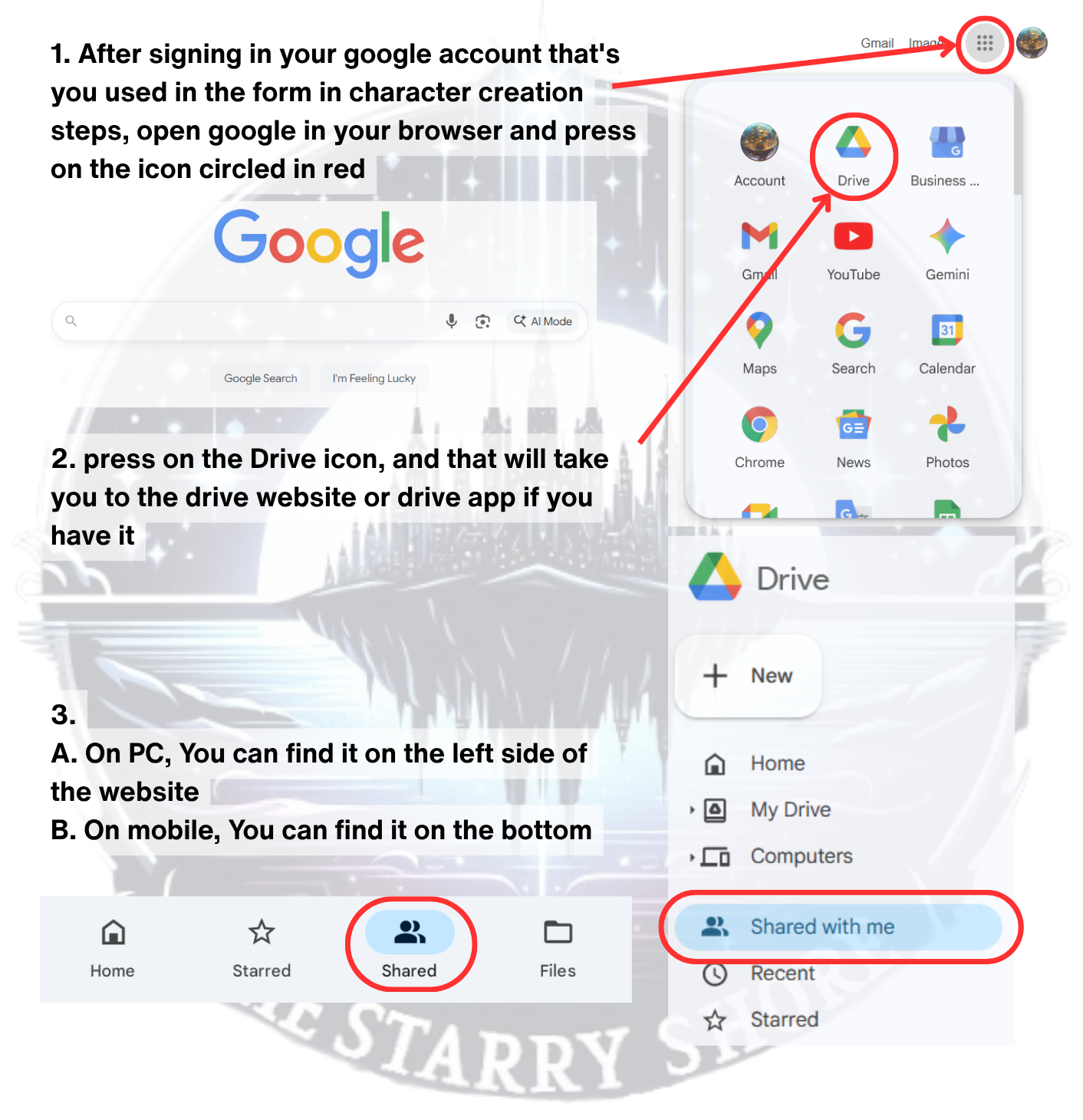
If you still can't find your folder, make sure to check that:
- you completed step one in the character-creation-steps .
- you're logged in with the same Google account you used in the form during step one.
✅ Allowed Material
📘 Official Content
All officially printed races/sub-races, classes/sub-classes, backgrounds, feats, and spells by Wizards of the Coast for Dungeons & Dragons 5th Edition are allowed.
Note: The 2024 Player's Handbook (One D&D / 5.5E) is not approved for use on this server.
Instead, check out our
2024 Server
🤝 Partnered Content
-
Critical Role (except Gunslinger subclass)
Explorer's Guide to Wildemount, Critical Role: Call of the Netherdeep, Tal’Dorei Campaign Setting Reborn
• P.S. Mystic Conflux can only be taken at T4 / Level 17 and above (Except during respec which can be taken at 16th level if you are level 17 or above in that respec). - Grim Hollow: Lairs of Etharis (except the feats), Player Pack (except Blade Breaker subclass)
-
The Griffon’s Saddlebag:
-
The Many Subclass: In T2 and higher, your number of Eldritch Heads cannot exceed half your warlock level (rounded up)
- Heliana’s Guide to Monster Hunting: Part 1 & 2: (except Magitech Firearms, Endure Spell, and crafting & harvesting feats)
- Other: Humblewood Campaign Setting, Humblewood Tales, Dungeons of Drakkenheim, Flee, Mortals!, Where Evil Lives, In Search of the Smuggler’s Secrets, Dungeons & Dragons vs. Rick and Morty, Frozen Sick, Monstrous Compendium Vol. 3: Minecraft Creatures, Lightning Keep, Tome of Beasts 1, Obojima: Tales from the Tall Grass, The Crooked Moon (except Sanguine Secrets)
-
Steinhardt's Guide to the Eldritch Hunt
(except Living Nightmare subclasses, backgrounds, Cannoneer, and optional replacement feats)-
P.S. For Jaeger:
- Multiclassing Prerequisites: Ability Score Minimum: Strength 13 or Dexterity 13
- Multiclassing Proficiencies Gained: Light armor, medium armor, simple weapons, martial weapons, firearm
- Allowed basic items: Cannon, Scythe, Cleaver
-
P.S. For Jaeger:
⛔ Banned Content
- Kobold Press: Book of Ebon Tides, Tales from the Shadows
- The Illrigger Revised
- The Lord of the Rings Roleplaying
- Grim Hollow: Player Guide
Creation Tips
-
Equipment Options: Use one of two base options:
- Starting equipment granted by class and background
- Max values for the starting gold rolls of your 1st class
- Hit Points: Average HP, not rolled. Take the maximum HP for 1st level and the average HP for all levels after.
- Multiclassing: Allowed.
- Backgrounds: Customization is allowed.
- Sources: You can use any content listed in Allowed Materials.
Note: All new characters begin with a special Sending Stone, as specified in the loot and items page.

Stitches
Played by Charlie
👥 Character Slots
Players are allowed to have as many characters as they want! The only limitation is your creativity :D
If you’re gonna be abusing it, remember, the gods of the Starry Shore are always watching!